Yes. Companies can connect Email Builder to their business applications using the API.
A solution that adapts to your environment
Every company has its own marketing ecosystem. Some use marketing automation platforms, others rely on a CRM, an ESP or an in-house solution.Email Builder integrates easily with these environments, simplifying campaign creation and delivery without requiring you to replace your existing tools.
You get a modern email editor while keeping your existing processes.
Connect your marketing tools
Email Builder is designed to work with leading solutions on the market. You can integrate your campaigns with your preferred platform to ensure a seamless process from creation to delivery.
Marketing Automation
Create your emails in Email Builder, then use them in your marketing automation platform to automate campaigns, nurture sequences or customer journeys.
CRM
Leverage your CRM data to personalize your campaigns and deliver more relevant communications. Your marketing teams can continue working with their existing tools while benefiting from a professional email editor.
Email Sending Platforms (ESP)
Once your campaign is finalized, export it directly to your sending platform. Keep your existing delivery processes and workflows without changing your infrastructure or adding unnecessary complexity.
API
Need a specific integration? The JustRelate API allows you to connect Email Builder to your business applications or custom developments and automate your processes.

Export clean, compatible HTML
Email HTML remains essential for ensuring reliable rendering across different email clients. Email Builder generates optimized HTML designed to provide excellent compatibility across major email environments.
Technical teams can also access the code when specific adjustments are required.
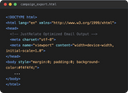
Why choose exportable HTML?
Keep control of your campaigns
You are not tied to a single platform. Your emails can be integrated into different tools according to your needs.
Avoid rebuilding campaigns
No need to recreate your emails in another solution after designing them. Create your campaign once, then use it within your existing environment.
Make life easier for technical teams
The generated HTML is clean, structured and ready to be used or further enhanced when necessary. Developers save time and only need to step in when their expertise adds real value.
Protect your investments
Modernize your email creation process without replacing the tools you already have in place. Email Builder complements your ecosystem rather than replacing it.

An open and scalable platform
Business needs evolve. That’s why Email Builder is designed to integrate easily with different technical environments.
Whether you use a cloud solution, an in-house system or multiple marketing platforms, you benefit from a flexible solution that can evolve with your organization.
Actionable use cases
Keep your sending platform
Continue using your preferred sending platform while benefiting from a more powerful email editor.
Connect multiple tools
Connect Email Builder to your CRM, marketing automation platform and media library to centralize creation.
Build a custom integration
Use the API to automate specific steps in your process or connect Email Builder to your internal applications.
Produce HTML ready for delivery
Create your emails in Email Builder and export them directly to your sending environment.
Frequently asked questions
Yes. Email Builder is designed to integrate with your existing environment and complement your current tools.
Yes. Email Builder is designed to integrate with your existing environment and complement your current tools.
Yes. You can export optimized HTML to use in your sending platform or in custom developments.
Yes. You can export optimized HTML to use in your sending platform or in custom developments.
Yes. Companies can connect Email Builder to their business applications using the API.
No. Email Builder integrates with your marketing stack and adapts to your existing processes.
No. Email Builder integrates with your marketing stack and adapts to your existing processes.
Yes. Its flexibility makes it suitable for companies managing multiple tools, brands or technical environments.
Yes. Its flexibility makes it suitable for companies managing multiple tools, brands or technical environments.